This selector finds instructions and downloads. It does not install software or run a translation model.
Start here / Tested walkthrough
One working route on an Apple silicon Mac
Tested October 8, 2026 on a MacBook Air M5, 24 GB memory, macOS 27.0.1. We used the standard Q4_K_M file and llama.cpp b11429. Other Mac configurations, Windows, Linux, phone apps and the special 1.25-bit / 2-bit formats have not been tested here.
Before starting: use an Apple silicon Mac and allow space for the model, runtime archive and extracted files. 24 GB is our test machine's memory, not a minimum requirement. These steps install files only inside a dedicated Downloads folder; no Homebrew or global runtime installation is needed.
01 — Download and verify the exact files
Open Terminal and paste this block. It creates a dedicated folder in Downloads, fetches the official arm64 runtime and the 1.13 GB standard model, and checks both SHA-256 hashes before proceeding. Keep the extracted runtime folder intact.
Paste this block in Terminal. It writes the small test prompt and runs the model locally with a 2,048-token context and a 128-token output cap.
cd "$HOME/Downloads/hy-mt2-b11429" &&
printf '%s\n' \
  'Translate the following text into Chinese. Note that you should only output the translated result without any additional explanation:' \
  'Hello, where is the train station?' > test-prompt.txt &&
./llama-b11429/llama-completion --model Hy-MT2-1.8B-Q4_K_M.gguf --file test-prompt.txt --jinja --single-turn --gpu-layers all --ctx-size 2048 --predict 128 --temp 0.7 --top-p 0.6 --top-k 20 --min-p 0 --repeat-penalty 1.05 --seed 42 --no-display-prompt --color off
03 — Repeat with network access denied
After the files are downloaded, this macOS sandbox rule denies networking to the translation process. It does not disconnect your Mac or other apps. This exact command worked on our tested macOS version.
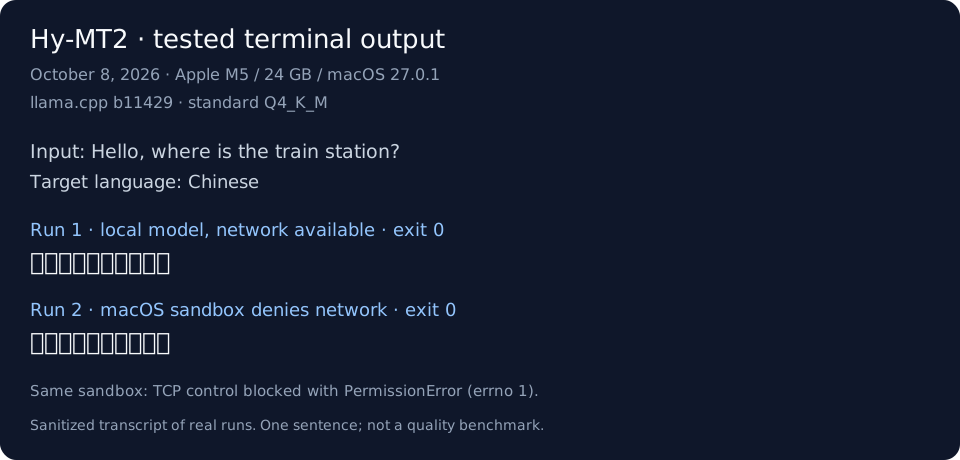
Both commands exited with code 0. The runtime also printed [end of text]. Sampling can produce a different valid translation; this sentence is a basic smoke test, not a quality benchmark.
Formatted transcript of our captured terminal output, not a screenshot.What we verified, and what this does not prove
Both file hashes matched upstream metadata. A TCP socket control connected outside the sandbox and failed inside it with PermissionError: Operation not permitted; translation then succeeded under the same network-denial rule. We denied network access to the inference process, rather than physically disconnecting the machine.
This covers one short English-to-Chinese sentence with these exact files. It does not establish minimum memory, speed, long-document accuracy or compatibility with other devices, model formats or runtime versions.
If a download or checksum fails, stop and compare the file with the linked official release; do not remove the hash check to force it through. An Intel Mac cannot use this arm64 runtime. If macOS blocks the binary, check its source and macOS security notice; this guide does not disable Gatekeeper. For a model-loading error, record the exact filename and runtime version and read the loading checks below.
Completed the steps or still stuck? Share your result so we can improve this route.
01 / Before you download
Pick a format your runtime understands
Hy-MT2 is a model family. The small download circulating online is one particular quantized version, not a complete translator app.
Model file
Listed size
What to check
Official files
1.8B · Q4_K_MStandard GGUF
1.13 GB
Our suggested starting route. Confirm Hy-MT2 support in your exact runtime version.
Sizes are the official Hugging Face file-list values checked on October 8, 2026. Tencent describes the 1.25-bit model as 440 MB; its file listing displays 462 MB. Neither is a total app size or a minimum memory specification.
For a desktop route, follow the llama.cpp installation instructions for your OS. Special quantized files may require a different build. On iPhone, use the official app route below.
02 — LOAD
Match the model file
For a standard desktop setup, choose a file from the official GGUF repository. For 1.25-bit or 2-bit, follow the model card in your selected route. On iPhone, download the model inside the app. Use Tencent's instructions for desktop prompt settings.
03 — VERIFY
Test, then disconnect
Translate the short sample below. After downloading all required assets, disconnect the network and repeat it. Successful offline use on your device is the check that matters.
A short test prompt, following Tencent's instruction format
Translate the following segment into Chinese, without additional explanation:
Hello, where is the train station?
For an exact tested route, use the Mac walkthrough above. These general steps are based on upstream documentation; other platforms and model formats have not been execution-tested here. No universal RAM minimum or performance claim is implied.
03 / Device notes
A model file and a phone app are different routes
Mac, Windows & Linux
Our Mac walkthrough records one tested M5 / Q4_K_M combination. Windows, Linux and other Mac configurations are not tested here. Match your OS, hardware and exact model format to the runtime.
Tencent Hy Translate advertises a downloadable offline model. Its App Store listing requires iOS 15.1 or later. Install the app and download the local model while online before testing offline translation.
This guide has not verified an official Hy-MT2 Android APK. A GGUF file is not an Android installer. Check the current Tencent project links for a supported app or development route before downloading third-party packages.
Check the exact model format and the application's current support. A generated “Use this model” snippet or a GGUF extension alone is not proof that a special 1.25-bit or 2-bit file will load.
“Unknown type” or “tensor offset mismatch” when loading
First record the full model filename, quantization format, and runtime version. Users reported loading failures with the 2-bit files in May 2026; special formats need matching runtime support. For 1.25-bit, check the STQ support PR. For 2-bit, follow its separate model card. Switching to a conventional GGUF is a route to try, not a verified fix for every error.
vLLM doesn't start, or reports a CUDA kernel error
Compare your installed vLLM, Transformers, and GPU environment with the current upstream instructions. The guide calls for building vLLM from source. Save the first error and complete environment details; repeatedly downloading the model is unlikely to explain a runtime or kernel mismatch.
Issue #9 and issue #11 document real failures. No single fix has been verified here for all devices.
Translations repeat, add commentary, or damage subtitle formatting
Start with a short prompt and use Tencent's translation instruction format and chat template. Compare the generation settings with the official examples before increasing context length. The current README lists an 8,192-token maximum context; long input plus output must fit the supported setup.
For subtitles, work in smaller batches and check cue counts, timestamps, and tags before replacing the original. A subtitle discussion reports formatting failures with long input. Smaller batches are a troubleshooting step, not a guarantee of valid SRT output.
Does 440 MB mean my phone only needs 440 MB of RAM?
No. It describes the storage size of one quantized model. Running the app and model also needs memory for the runtime, working data, and context. This guide does not publish a minimum RAM requirement because we have not measured it across devices.
Can this page translate text or download the model for me?
No. The selector creates a setup checklist and links to the upstream sources. It does not load a model or send text for translation. The guide and model comparison remain readable with JavaScript disabled.
Help improve this guide
Did you get a translation working?
Tell us what happened so we can improve the instructions that need it most.
Reviewed October 8, 2026. We checked the source documentation, file listings and linked issue discussions, and ran the exact Mac setup documented above. That test covers one short English-to-Chinese translation, including a repeat with network access denied to the process. It is not a translation-quality or performance benchmark. Other devices, model formats and regional download availability remain untested here. Check the linked sources for later changes.
OneTaskKit is an independent site and is not affiliated with Tencent, Hugging Face, or the runtime projects.
 OneTask